
Broken stores don't make money.
Find out what's broken
One domain in. A repeatable, evidence-backed Shopify QA audit out covering links, SEO, JavaScript, performance, structured data and more.

01The risk
Small storefront failures compound quietly.
A campaign lands on a 404. Product pages ship without search snippets. A theme update throws errors only after handoff. SQA turns that invisible QA debt into a prioritized queue.
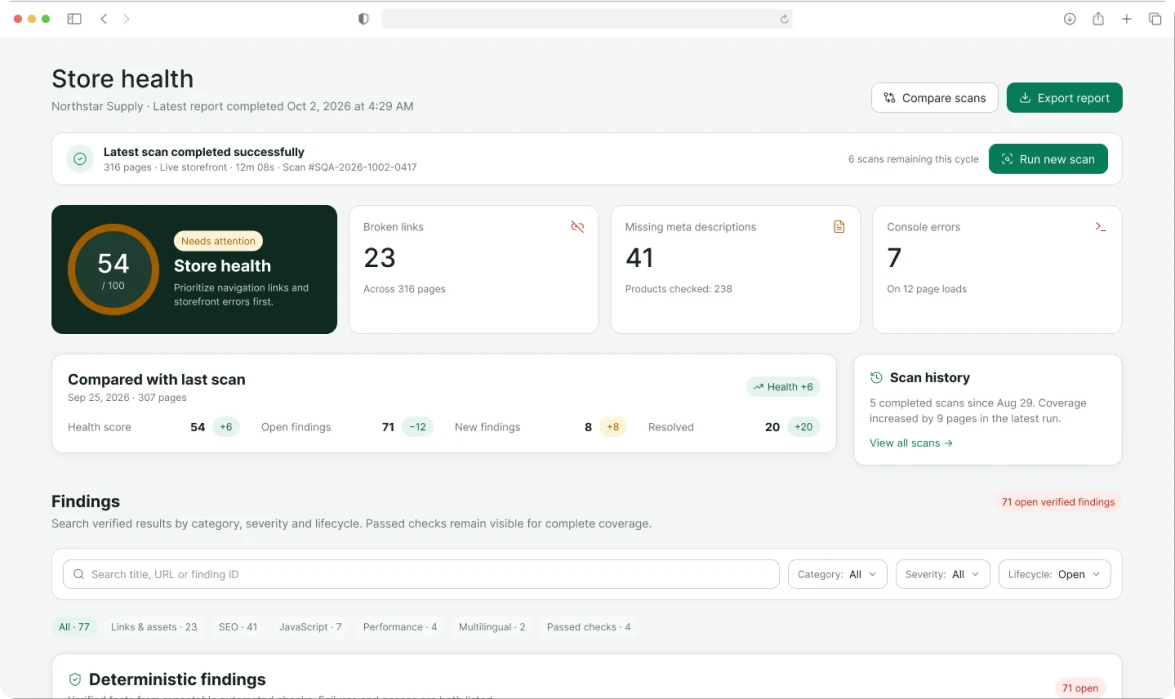
71 verified findings
From one sample storefront · No admin access- 01.123 found
Broken paths leak paid traffic
Navigation, collection and product links are checked at scale—not sampled by hand.
- 01.241 found
SEO omissions hide in the catalogue
Missing descriptions and structured data become a count you can own, not a vague checklist.
- 01.37 errors
Storefront scripts fail in production
Console errors are captured across real page loads with evidence developers can reproduce.
- 01.4Repeatable
Handoffs go stale the moment they ship
Run the same deterministic suite before launch, after theme changes and on a schedule.
02How it works
One domain. Three steps. No setup theatre.
- 01
Enter the storefront domain
SQA scans the public, live experience a shopper can reach. No Shopify admin permissions and no theme mutation.
Input · yourstore.com - 02
Watch repeatable checks run
The crawler maps pages and executes deterministic checks across links, metadata, scripts, locale routes and more.
Free sample · up to 40 pages - 03
Prioritize with evidence
Start with the free score and counts. Unlock exact URLs, remediation steps, AI review and a shareable PDF by email.
Output · findings / evidence / PDF
See whether there is a problem before giving us your email.
The health score and category counts are free. Unlock only when the evidence is worth acting on.
| What you get | Free · no email | Unlock by email |
|---|---|---|
| Store health score | 54 / 100 | Included |
| Finding counts by category | Visible | Included |
| Exact affected URLs | Count only | Full location list |
| Fix instructions and evidence | Summary only | Step-by-step guidance |
| AI-assisted review + PDF | Not included | Review queue and report |
03The check catalogue
Facts first. Eight surfaces, one consistent methodology.
The same input produces the same test logic, with coverage and evidence attached.
- CHK-01
Links & assets
HTTP status, redirect chains, missing images and inaccessible assets.
1,842 links · 1,126 images - CHK-02
Performance
Response timing, payload weight and page-level performance signals.
316 pages · repeatable thresholds - CHK-03
SEO
Titles, meta descriptions, canonical tags and indexability.
238 products · 42 collections - CHK-04
Structured data
Product schema presence, validity and required commerce fields.
JSON-LD parsed on every template - CHK-05
Storefront JavaScript
Console errors captured during instrumented storefront page loads.
12 page types · evidence attached - CHK-06
Multilingual
Hreflang reciprocity, locale routes and translated metadata gaps.
632 locale URLs - CHK-07
Trust & conversion
Policy links, contact routes and essential checkout trust signals.
Deterministic presence checks only - CHK-08
Mobile
Viewport configuration and machine-verifiable mobile readiness signals.
No claim of reliable visual bug detection
AI-assisted · Provisional
Possible issues
review these
These observations are not confirmed findings. They are suggestions for a human reviewer, kept apart from verified results.
Human review required- Possible mobile overlap near add-to-cartProducts / trail-lantern · Model observationReview
- Possible hierarchy inconsistency on collection pages3 collection templates · Model observationReview
- Returns copy may be difficult to find before checkoutTrust review · Model observationReview
04Who it is for
A common QA language across commerce teams.
Specific enough for developers. Clear enough for the person accountable for revenue.
- Merchants
Know what needs attention before the next campaign.
Replace launch-day guesswork with a prioritized, readable health report.
- Check after theme or catalogue changes
- Share fixes with a freelancer
- Track store health over time
- Agencies
Standardize pre-handover QA without another spreadsheet.
Give every project the same test suite, evidence format and client-ready report.
- Repeatable acceptance checks
- Exact URLs for tickets
- PDF for client handover
- Shopify app teams
Catch storefront side effects before merchants do.
Scan reference stores before release and monitor the live footprint after rollout.
- Regression signals by release
- Console evidence for debugging
- Multi-store professional plan
Continuous confidence
Before handover. After launch. Before the next change.
Use one-off audits for release gates, then re-scan from the Shopify app to catch regressions as catalogues, apps and themes evolve.
Explore monitoring- T−48HPre-handover baselineCapture issues before client reviewComplete
- T−2HPre-launch verificationConfirm fixes and new critical findingsReady
- T+24HPost-launch scanCheck production routes and scriptsScheduled
- WeeklyOngoing monitoringCompare health and alert on regressionsActive
Get exact URLs, fix instructions and the PDF report.
Your score and counts stay free. Use an email only when you want the actionable report.
05FAQ
Details worth checking before you scan.
Need the methodology or a procurement answer? Talk to our team
Does SQA change anything in my Shopify store?
No. SQA is read-only. It scans public storefront pages and never mutates your theme, catalogue, navigation or settings.
Do I need to install a Shopify app?
No. The free audit needs only a public storefront domain and runs externally. The Shopify app adds full-catalogue scans, history and re-scans.
What is free without email?
Your health score and finding counts by category. Exact URLs, evidence, fix guidance, the AI review and the PDF are available when you unlock the report.
Are AI observations confirmed bugs?
No. They are clearly labelled suggestions for human review and are kept separate from verified, deterministic findings. They never change your score.
Can SQA reliably detect visual bugs?
No tool can promise that. SQA only states verifiable facts as findings; visual concerns are offered as possible issues for a person to check.
Can agencies use reports for handover?
Yes. Reports support release gates, client sign-off and a shared record of what was checked, including what could not be checked.